


With the Employment Solutions Referral Program, you can help your friends find their next great opportunity, and earn $100 for every qualified referral! Follow this quick guide to locate and share your unique Referral Link directly from your Employee Portal.
Finding your link takes less than a minute. Once you are logged into your dashboard, follow these steps:
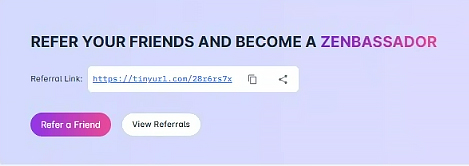
Look for the purple and white section titled “REFER YOUR FRIENDS AND BECOME A ZENBASSADOR.”
Your personal Referral Link is displayed clearly in the white box within that banner.
Ready to spread the word? You have two easy ways to share:
Click the Share icon next to your unique link to access a QR code or seamlessly launch various social media sites to share directly from your web page or device.
Click the Copy icon (next to the link) to save it to your clipboard. You can then paste it into a text message, email, or social media post.
Click the Refer a Friend button to quickly send the link to someone specific.
Want to see who has applied? Click the View Referrals button to monitor your progress and potential rewards.
Post your link on LinkedIn, Facebook, Instagram or SnapChat to reach your entire professional network at once.
When sending the link, mention why you enjoy working with Employment Solutions to give your friends extra confidence!